How to Remove Suggested Contacts From iOS Share Sheet - MacRumors
Skip to Content

How to Remove Suggested Contacts From iOS Share Sheet

by

Does your iPhone keep displaying certain contacts whenever you go to share something in iOS, and you'd rather not see them? Keep reading to learn how to get rid of them.
share sheet
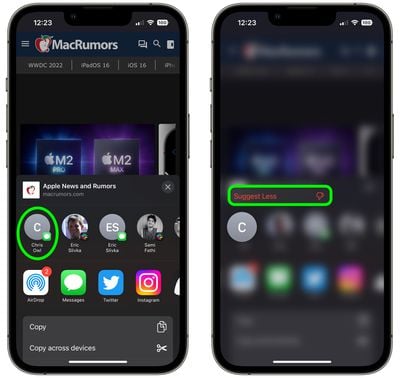
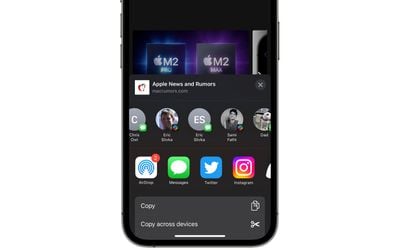
Whenever you go to share something on your iPhone or iPad using the Share button, iOS brings up the activity view – often called the Share Sheet – at the top of which is a row of suggested contacts with whom you've interacted recently. Swiping along this row reveals more contacts, and the icon in the corner of each profile picture indicates the app that you often use to communicate with that person.

These suggested contacts are useful if you share a lot of things with the same people, but there may be times when you'd prefer not to see specific contacts there, for example if someone is a duplicate suggestion over multiple apps, or if you don't want to draw attention to your regular comms with a certain someone. Whatever the reason, you can actually steer these sharing suggestions to appear less often, or not at all. Here's how.

Make Contacts Appear Less Often in iOS Share Sheet

  1. Tap the Share button (the box with an arrow pointing out) in any app to bring up the Share Sheet.
  2. Long press on the suggested contact that you want to see less often in the Share Sheet.
  3. Tap Suggest Less in the popover menu.

share sheet

Bear in mind, doing this won't guarantee that the contact doesn't appear in the Share Sheet again in future, but if you keep repeating it whenever they do show up, iOS will eventually get the message.

Remove All Contacts From iOS Share Sheet

Short of deleting their contact in the Contacts app, the only way to guarantee that someone doesn't keep turning up on your Share Sheet is to disable the contact suggestions row completely.

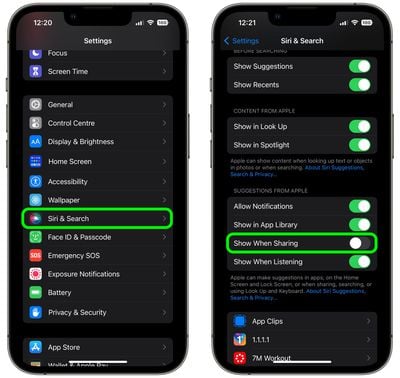
  1. Open the Settings app.
  2. Scroll down and tap Siri & Search.
  3. Under the "Suggestions From Apple" section, toggle off the switch next to Show When Sharing.
settings

That's all there is to it. Now the next time you invoke the Share Sheet, you won't see any contact profiles at the top. You can reverse the change just as easily by switching on the Show When Sharing toggle again.


Top Rated Comments

hellosil Avatar
47 months ago
Remove All Contacts From iOS Share Sheet 🥳
Thank you!
Score: 11 Votes (Like | Disagree)
ahmedg Avatar
47 months ago
Oh my God. First time ever a feature that I didn’t know existed. And guess what? I searched for something like this just yesterday.
Score: 8 Votes (Like | Disagree)
47 months ago
I’m so glad Apple added the option to turn this off. I used to be so scared I’d send someone a link to something I didn’t want to send them… :oops:
Score: 7 Votes (Like | Disagree)
MisterSavage Avatar
47 months ago
I was actually shocked at how dumb the selection process was for this. You only sent a DM to a person one time on Slack? Let's suggest them every single time you share something and not use people you contact all the time.
Score: 6 Votes (Like | Disagree)
JM Avatar
47 months ago
😱

1000 blessings on you and you family for this tip 🙌
Score: 5 Votes (Like | Disagree)
47 months ago
I don’t understand why there isn’t an option to remove a specific contact entirely. Suggest less is kind of patronizing.

“Yeah yeah we know you *think* you don’t want to see this contact, but we know better.”
Score: 4 Votes (Like | Disagree)

Popular Stories

iPhone 18 Pro Deep Red Feature

iPhone 18 Pro Launching Later This Year With These 12 New Features

Wednesday March 18, 2026 7:39 am PDT by
While the iPhone 18 Pro and iPhone 18 Pro Max are not expected to launch for another six months or so, there are already plenty of rumors about the devices. It was initially reported that the iPhone 18 Pro models would have fully under-screen Face ID, with only a front camera visible in the top-left corner of the screen. However, the latest rumors indicate that only one Face ID component...


imac video apple feature

Apple Released Yet Another New Product Today

Friday March 20, 2026 2:39 pm PDT by
Apple has unveiled a whopping nine new products so far this March, including an iPhone 17e, iPad Air models with the M4 chip, MacBook Air models with the M5 chip, MacBook Pro models with M5 Pro and M5 Max chips, the all-new MacBook Neo, an updated Studio Display, a higher-end Studio Display XDR, AirPods Max 2, and now the Nike Powerbeats Pro 2. iPhone 17e features the same overall design as...
ios 26 4 pastel

iOS 26.4: Top 10 New Features Coming to Your iPhone

Friday March 20, 2026 2:44 pm PDT by
iOS 26.4 isn't the major update with new Siri features that we hoped for, but there are some useful quality of life improvements, and a little bit of fun with an AI playlist generator and new emoji characters. Playlist Playground - Apple Music has a Playlist Playground option that lets you generate playlists from text-based descriptions. You can include moods, feelings, activities, or...